e-Discovery For The Rest of Us (Solos, That Is!)

LAST UPDATED
Although I didn’t personally attend Legal Tech New York, I understand that e-discovery for small firms was a hot topic there. I am working on some issues touching on e-discovery in my day job, too, so I got to thinking about what options are out there for solos and small firms regarding management of the e-discovery juggernaut.
There is no doubt that e-discovery, once a novel and foreign concept to paper-based lawyering, is now a mainstay of litigation across the spectrum. The Federal Rules of Civil Procedure were amended in 2006 to accommodate e-discovery. The Model Rules of Professional conduct were amended in 2012 to require that lawyers be competent, technologically speaking, including developing awareness of the benefits and risks of emerging technology. My own state of Massachusetts followed suit, effective July 1, 2015.
If you are trying to get up to speed on the concepts (or seeking to deepen your understanding) a great place to look is the Sedona conference website. What is the Sedona Conference, you ask? The Sedona Conference is a nonprofit, 501(c)(3) research and educational institute that considers law and policy in the areas of antitrust law, complex litigation, and intellectual property rights. It was founded in 1997 by Richard G. Braman, but has expanded to include really smart lawyers, judges and experts in the target fields, as well as small groups of invitation-only participants. One of the target fields of discussion for the conference is electronic discovery, preservation, retention and production. The Sedona Conference Principles are often cited as authority in legal disputes and learned treatises. You can check out their e-discovery publications here - happy reading!
Let’s think for a minute about the breadth and complexity of this subject. The definitions attached to documents and records can be so broad that protectable, retainable data includes far more than just your stored Word documents and email. It can include the GPS logging on a party’s cell phone, pings to cell phone towers, metadata, the social media musings on X or Facebook, or even the images from a red light camera on a given night. So, managing all of this can get pretty crazy. That is where the concept of proportionality comes in - what makes sense to preserve and produce in the context of your particular case. The Federal Rules of Civil Procedure were amended again, effective December 1, 2015, to address some of the overwhelm: Rule 26(b)(1) now limits discovery to what is relevant and “proportional to the needs of the case.” Proportionality and the spirit of compromise can be your dearest friend in this endeavor - more on that below.
As lawyers, you may be less concerned about how to store the massive amounts of information pre-suit, and more concerned about assisting your client on how to hold and produce responsive information within the context of the litigation. You need to have some grasp on this subject because if you do your job poorly, there can be some pretty serious consequences for your client, such as sanctions, penalties and even adverse inference instructions to the jury. So, you really have to get a handle on your client’s electronically stored information (“ESI”) and figure out how to properly funnel it if called upon to produce it in litigation.
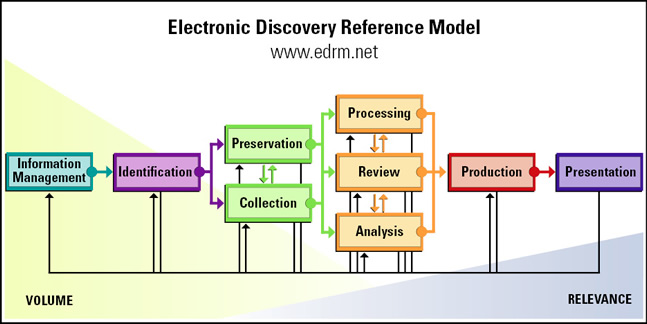
I am not going to get into the entire process here, as it would take a treatise to explain from start to finish the issues surrounding retention, storage, preservation, production and ultimately destruction of data no longer subject to preservation duties. Hopefully your client has a handle on this; if not, then you will need to have a sit down with them about their obligations to preserve and produce.
Instead, I just want to brush the surface of the technology and offer a few simple pointers. For example, how do you manage the scale and cost for a small case on a small firm budget? There are ways. Perhaps the single most effective way is to work with opposing counsel to keep the scale limited and “proportionate” to the real needs of the case. This process works very well in situations where you have a good relationship with opposing counsel and you can get all sorts of points with the judge if you approach the bench with an agreed solution to e-discovery in your matter. These agreements should extend to data sets and exchange protocol - it might be possible to come to a meeting of the minds on low cost, low volume solutions. Also, really consider whether you can keep the data local, rather than paying large fees to someone else to host it. Finally, work with native formats as much as possible, rather than employing an expensive process to convert and decode.
With respect to technology - what means are out there for solos to leverage some of the same tools that larger organizations have available to collect, organize, search and produce this information? The market for small firm tools appears to be a growth sector in the technology - law industry. At LTNY, HP Autonomy, Recommind and Kroll Ontrack adding Relativity to the ediscovery.com product suite had some announcements of interest.
In a 2013 article in the GP Solo Section at the American Bar Association website, entitled Cost Effective e-Discovery for Small Cases, Tom O’Connor recommends a few reasonably priced solutions:
- Acrobat Legal Edition: www.adobe.com
- Digital WarRoom Pro: www.digitalwarroom.com
- Discovery Cloud: www.discoverycloud.nextpoint.com
- dtSearch Desktop: www.dtsearch.com
- Harvester: www.pinpointlabs.com
- Intella: www.vound-software.com
- Lexbe Online: www.lexbe.com
- Quick View Plus: www.avantstar.com
- SafeCopy: www.pinpointlabs.com
I have not used these programs and some may no longer be supported - I am including them here to give you a starting point for investigating what is out there and what might be available to fit your small firm budget. If you have used any of these, would love some feedback in the comments for the benefit of your fellow solos.
My dear friend Susan Cartier Liebel also has a suggestion for a reasonably-priced, cloud-based scalable option for storing and processing called Logikcull (now part of Reveal). This tool is designed for modern lawyers as it offers a mobile interface to easily tag and share uploaded data from your iDevice. It also appears very simple to use. Upload documents / files, receive an email when the upload process is complete, and enjoy de-duplicated, OCR’ed, virus-scanned, metadata and text extracted, PDF-rendered, loaded and review-ready, and exportable-to-load content. If security concerns you with a cloud option, Logikcull offers always-on SSL, data encryption at rest, as well as complex password requirements and SOC2 protocols. Fully-automated and subscription based - check their site for current pricing. You can also check out Cicayda which claims to be a 'smart, affordable choice' with pricing transparency.
Finally, because I love free, I stumbled on this tool developed by Shannon Brown called ProLorem, a predictive coding software tool. Predictive coding allows a lawyer to set parameters for categorizing or tagging a set of electronic documents. The tool learns the patterns and then applies the same “reasoning” across the entire set of documents to alleviate some of the tedious manual aspects of tagging and organizing docs around categories. More specifically, ProLorem gathers a small subset of docs which the lawyer can analyze and assign labels - e.g. privileged or non-privileged, relevant or irrelevant, responsive or non-responsive, etc. The software examines the lawyer’s process in this “seed set”, learns the patterns and applies the same analysis to the larger set. Version 1 was released for general use in October, 2013, following 12 months of testing. Well, all right then - way to go ProLorem.
Hopefully, you are already on top of this morass. If not, hopefully this article has given you some food for thought and a few places to explore for more information. Would love to hear your thoughts on this subject. Happy collecting, preserving, organizing and producing!
Want to learn more about using e-Discovery in your practice? Learn from SPU faculty member, Stephen Teppler in his course Introduction to E-Discovery.
Get one practical lesson for your firm every week.
Free, from practicing lawyers. Every issue includes a lesson from the archive. Unsubscribe anytime.
Martha Sperry taught at Solo Practice University (2011–2013).
Full profile and more posts →