My wife and I have a pretty good division of labor in our house – each of use does the things that speak to our respective strengths – it is a good team situation. Some of my duties are the traditional “guy things” that involve minor (very minor) repairs. Therefore, I have to make occasional visits to hardware stores where I, inevitably, see some fabulous piece of hardware I would love to possess but cannot possibly justify.
The same thing happens when you begin the practice of law as a solo – you have a myriad of choices when it comes to resources but you have to think about what you really NEED and can actually AFFORD. The key, for me, is to focus your efforts to conserve your resources so you can keep the practice going on limited funds. I have said before that many of these decisions are personal and related to your specific goals. What I describe below are MY decisions for MY practice – do it your way but try to be conservative with your resources.
My budget going in was approximately $1000.00 in up-front costs and about $250.00 per month in continuing costs. This seems modest – I know that – but I promise you there is plenty of time to spend money later…you cannot get the money back if you spend too much or allocate it in the wrong areas. So, what did I choose and why?
- PRACTICE GUIDES: Depending on the area of law you are practicing, personal practice guides are more or less easily affordable. In Texas, we have the Jones McClure publications (featuring the famous “O’Connors Causes of Action”). These all-in-one manuals are a great desk resource. One of my supervising lawyers at the firm I clerked with said “…a hobo could practice law if he had Causes of Action…” Maybe it is not totally true, but it is not far off either.
Some practice guides (i.e. Nimmer on Copyrights) are not practical straight out of law school into practice – they are too expensive to purchase and maintain (you would have to purchase updates as the law changes). If you must have these publications, I suggest you just plan to make regular visits to your local law library OR get online access through a legal research service.
- ONLINE RESEARCH RESOURCES: I chose Lexis. It is a complicated decision and has a lot to do with personal preference. I used both Lexis and Westlaw extensively in law school so I know what both can do. My concerns were price (Lexis just seems to “get” the solo better than Westlaw), fit (I just like Lexis better), and ability to adjust as my needs change (Lexis can add or swap out resources with one phone call). You DO have to sign a contract and it is not free. However, you have to consider the risks of malpractice. In this world, this is a necessary investment.
[Caveat – I am prohibited by my contract from listing how much I am paying for Lexis but they are awesome with solos – you can get a great deal if you negotiate & select only what you really need for your practice!]
- MARKETING AND PROMOTIONS: I am not a branding expert but I am trying to create a symmetric image for myself as an attorney. This is especially important if, like me, you have another identity as a professional (I also own a publishing company). Early on, I have three basic needs: [1] A nice business card – I chose two-sided with a custom blue that will appear on everything I use for promotional or identity purposes. [2] An informal (this is what stationers call a correspondence card) – I use these for writing thank you notes and “nice to meet you” contacts. The art of a hand written note is going the way of the dodo bird – this is a good way to set yourself apart. You do not have to write a novel when being in contact – these cards have just enough room to say hello, make nice, and make a good impression. Do not forget to include your business card every time you send an informal. [3] A self-inking logo stamp with my phone contacts and email address (I use this to stamp books, files, and document holders).
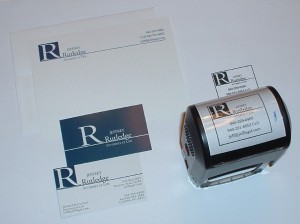
Jefflegal's Promo Toolbox
My current promo pieces – [top left] informal cards, [bottom left] both sides of
my current business card, [right] self-inking logo and identity stamp.
I do letterhead and envelopes on my computer – this is nearly the same quality as you would get from offset/engraved and you can adjust the content anytime you like. You can always use the digital letterhead for printing if you prefer but for the time being, especially at the beginning, this is a great cost saver. For my purposes, it helps to have all correspondence digital to start so I can archive everything. This is the way things are going – do not spend on letterhead.
The next step in this process will be a web site (in progress now & an additional cost to the figures noted above) – this is a great deal more involved than I really want but it has to be done right. I hired a designer in Nashville (contact information available on request) who is awesome (and reasonable price-wise). I had headshots done by a photographer here in Dallas (contact information available on request ). Professional headshots are necessary – I have been “getting by” with a blurry version now but it makes me look like I do not care…in the next week or two, you will see my new headshot on this column and you will know I do care. Before we “go live” with the web site, I have to have the State Bar review and approve the material (this is an extra expense but unavoidable as the penalties for violating advertising rules can be severe).
These are all key steps in communicating when you meet someone, after you meet someone, if you leave something behind (like a book – that is what the stamp is for!), and when someone wants to find you on the internet. There is also the issue of social media (Twitter, etc.) but that is a subject for a column down the road.
[NOTE – I use the same type, logo, and color scheme on everything – this is part of the branding that helps you present a symmetric and professional image.]
- OFFICES/VIRTUALITY: I want to point out (as I have at SPU before) that there is a great deal of disagreement about what is virtual and what is not. I will deal with that issue in a later column. That aside, I do not think there is any need for a physical office as a solo right out of law school. There are ways to do this on the cheap if you must – space sharing, office centers (Regis is a great operation), etc. I do not feel the need for a physical office but I have worked out of my home for the last 10 years or so and I have no children (I do have three dogs – one of them a puppy that requires constant attention). This is one of those personal decisions you have to make for yourself BUT remember every dollar in expense is one less in your pocket as income. I would be careful about committing to anything – you can get credit but in this economy, as a rookie solo, be careful with debt. It can crush you – many of us have law school debt so carrying more makes no sense to start. What you can do without cost is best. Besides, what is the point of buying furniture, computers, and the like if you do not have clients to pay the bills?
- ASSOCIATIONS: I joined a small bar association in my area (already got a paying referral from them!). I go to the monthly luncheons – get my CLE credit – and get to meet area lawyers. It is a good deal (low annual dues), great networking, and the lunch is pretty good. In addition, the country club where the meetings are held is about 3 minutes from my home. In the Dallas area, there are more bar associations than you can join and maintain – in any case, choose one (or more if you can sustain the relationship) and go to it. Early on, it is a great way to pick up cases that busy lawyers do not want AND to meet lawyers you can refer cases that are out of your interest area or over your head.
I am one of those people who talks in an elevator – the skill was born in me. As a result, I meet people everywhere. The best associations are the ones you make yourself FREE without any formal structure. I have a client who is a greeter at my local Walmart; I have another client who was formerly my wife’s personal shopper at Nordstrom and now operates a stable. You do not have to pay money or have a building to get clients – especially when you are starting out.
The takeaway from all this is “get what you need and ignore the rest.” I suppose we would all love to justify a massive budget with luxury and all the trappings of success; the problem is that you will not get there if you invest too much – too soon – in the wrong resources. You may want that expensive table saw but if you will not really use it – and buying it means you will not have a tool you will use and really need – that purchasing decision is a mistake. You can ALWAYS spend more later…start out by keeping the initial investment and monthly burden low. That way, you will be able to shoulder the load and acquire additional resources and commitments as your practice and skills expand.
What tools are you finding essential at start up and why?
All opinions, advice, and experiences of guest bloggers/columnists are those of the author and do not necessarily reflect the opinions, practices or experiences of Solo Practice University®.


Jeff,
Great thoughts. I fully agree with do what works and keep what you need and jettison what you don’t. I am a proponent of the office outside of the home. However, my situation is different from yours. I was 13 years into practice when i went solo. I had clients that followed and I am also constitutionally incapable of working efficiently from home.
This is great advice. Keep it up.
Thanks Chris – law practice is so personal it’s inevitable everyone will make choices that fit their needs and practice. Just as you have done, leaving the unnecessary trappings on the cutting room floor is a great help – not just for the survival of the practice but for maximizing the bottom line. I’ll keep updating my progress over time so others can benefit from choices as they consider their own. Thanks for sharing! – Jeff
A couple of notes (from my experiences):
1. Get a scanner. A *good* one. It won’t take much searching on-line to find the brand many lawyers swear by (I don’t want to product pitch here). A fast, reliable scanner with Acrobat is worth every cent.
2. I recently signed a contract with Westlaw for Westlaw Next. I, too, once had a preference for Lexis. But I have found recently that you can negotiate with West as well, and they are becoming more “solo friendly”. I also found that Next (in my opinion and experience) has passed Lexis in terms of usability. Many may still prefer Lexis–personal preference is really important in research products, I think. But for those of us a few years out who have experience with the “old” Westlaw, it is well worth making sure to evaluate Next as you look at what research tool is right for you.
3. I cannot recommend local bar associations enough. As a solo, the greatest resource I’ve got (aside from paying clients who like to refer my services) are the other solo/small firm practitioners in my area. Join your local/state bar associations, and save your money with the ABA.
Just my .02…
Thanks Dave – it’s nice to hear different thoughts on electronic research…valuable addition to the dialogue. SCANNER – great idea and indispensable for every office – I personally have the Fujitsu Scansnap 510S – it’s fast, portable, and easy to use. For document preservation, it’s my personal choice. LOCAL BAR – I get regular referrals (which was a surprise to me…) – the contacts are great, the advice from other solos is invaluable, and referrals I send out (for issues I do not want or cannot help with) help a great deal too. Thanks for the great advice Dave!
Who is the web designer in Nashville?
My Nashville-based web designer is Jeremy Mitchell (jeremymitchell.com) – he’s the best and he has a great Boston Terrier (lucysitgooddog.com). You’ll love his work!